 Companion for Creatio
How to deploy a Creatio package to another environment
Download the package from the source environment with clio pull-pkg, install it on the target with clio push-pkg, then compile, clear Redis and restart the target. To move a whole application with all of its packages, use clio deploy-application MyApp -e dev -d test. Remember that packages carry configuration, not the records in your lookups or sections; data needs its own step.
Every Creatio project hits the same moment: the change works on your development site and now has to reach test, then production. Creatio stores configuration in packages, so "deploying" means moving packages from one environment to another and making the target pick them up. This guide shows the clio commands for that, the order they should run in, and the mistakes that cause most failed deployments.
Before you start
- Install clio, the open-source Creatio command line, as a .NET global tool:
dotnet tool install clio -g. It needs the .NET SDK. - Register both environments once, so every later command can refer to them by name:
clio reg-web-app dev -u https://dev.example.creatio.com -l Supervisor -p '***'
clio reg-web-app test -u https://test.example.creatio.com -l Supervisor -p '***'
clio ping-app -e dev
clio ping-app -e test
The login needs administrator rights on each environment. ping-app confirms clio can reach the site and sign in before you try anything bigger.
Option 1: deploy one package
1. Download it from the source
clio pull-pkg UsrOrders -e devThis downloads the package to your local file system. The default download path does not need cliogate on the environment.
2. Install it on the target
clio push-pkg UsrOrders -e testpush-pkg accepts a package folder or a .zip/.gz archive. It backs up the package before installing unless you pass --skip-backup true, and on .NET Creatio, or when developer mode is on, it restarts the application after a successful install.
3. Let the target pick it up
Installing is only half the job. If the package contains C# code, the configuration has to compile, and cached schemas have to be dropped. Run these in this order, so a failed compile stops you before anything else is torn down:
clio compile-configuration -e test
clio clear-redis-db -e test
clio restart-web-app -e test --wait-ready
compile-configuration shows live progress and reports errors per project; clio last-compilation-log -e test shows the last log again if you need it. --wait-ready makes the restart wait until Creatio is really serving requests again, which is the right moment to start testing.
Option 2: deploy a whole application
A Creatio application bundles several packages. Moving them one by one is slow and easy to get wrong, so clio can copy the application package between environments in one step:
clio list-apps -e dev
clio deploy-application UsrOrderManagement -e dev -d test
-e is the source environment and -d the destination. Then run the same compile, Redis and restart steps on the target.
What usually goes wrong
- A dependency is missing on the target. A package that depends on another package will not install cleanly until that package exists on the target. Deploy dependencies first, or deploy the application, which carries its packages together.
- Someone changed the target directly. Pushing a package overwrites changes made to that package on the target. Pull from the target and compare before you push to a shared environment.
- The package is locked or has the wrong maintainer. Check with
clio list-packages -e test;clio unlock-packageandclio lock-packagechange the lock state. - Data did not come along. Packages carry configuration. Lookup values and records stay behind unless they are bound to the package. See migrating data between environments.
- Restarting a shared environment. A restart signs everyone out for a moment and the first page load afterwards is slow. Fine on your own dev site; plan it on a shared one.
The one-window way
Companion for Creatio runs the same steps from a desktop app. On the Packages screen, pick a package and choose Deploy to another environment; on Applications, Deploy to environment moves a whole application and previews its package dependencies, marked missing or present on the target, before you confirm. A drift guard blocks pushing over changes you have not pulled, and Apply changes runs compile, Redis flush and restart as one tracked job.
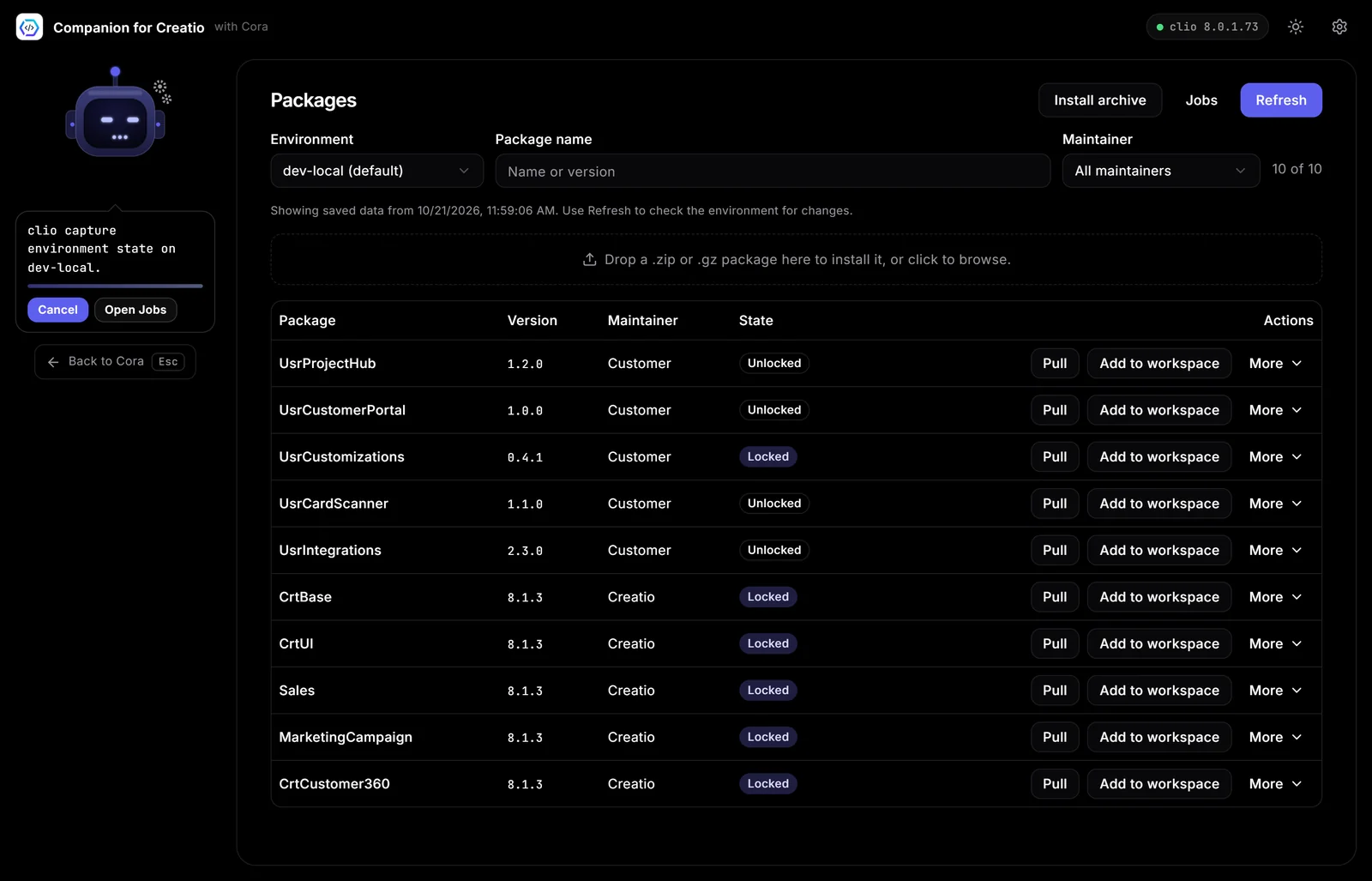
Companion for Creatio is a free desktop app for Windows and macOS that runs these clio steps for you, as jobs you can watch and cancel.